
Controls and input
Full controller support including DualShock and DualSense. Since 7 November you can unequip tools from the hotbar with a controller, and since 9 November that works on gamepad too.
Input is the part of this game that changed most in week one, and most of those changes were about the hotbar rather than the buttons.
Every figure below is checked against Pequi studios announcements or Steam's own endpoints on 2026-11-09.
Full controller support, three patches touching input in seven days, and no published keybind list. This page covers what the game documents about controls and what it deliberately leaves to the settings menu.
Steam's own input claims
| Feature | Status |
|---|---|
| Full controller support | Yes |
| DualShock controller support | Yes |
| DualSense controller support | Yes |
| Keyboard and mouse | Supported, implicitly |
| Steam Input remapping | Not documented |
Full controller support is Valve's own classification, which means the game can be played start to finish with a pad without touching a keyboard.
Three patches, one hotbar
The hotbar is a row of slots at the bottom of the screen, and nearly every input change in launch week was about it.
| Date | Change |
|---|---|
| 7 November | Controller can unequip tools from the hotbar |
| 9 November | Gamepad hotbar unequip added |
| 5 November | First boss interaction button fixed |
The 7 and 9 November entries look like duplicates and are not. The first added hotbar unequipping for controllers; the second extended it to gamepads specifically. On a standard controller, a feature that did not work after the 7 November patch was waiting on 9 November.
One practical consequence: unequipping a tool is how you interact with things a tool would otherwise hit. Moving furniture while the game keeps swinging at it? Empty your hands. Since 7 November that is a native action rather than something requiring the hammer.
7 November: furniture by hand
Worth restating on a controls page because it is fundamentally an input change. Moving buildings and decorative furniture became a native character action, meaning no tool equipped. The hammer is now exclusively for destroying structures.
The reasoning in the announcement is about interaction design: you can move buildings from the very beginning of the game, before unlocking the hammer, and selecting furniture is easier without accidentally grabbing the floor or nearby structures.
Three separate verbs now exist where there used to be one: walk up and interact to move, equip a hammer to demolish, equip a tool to use it on the world. Muscle memory from the first week will notice this one.
Attack and throw
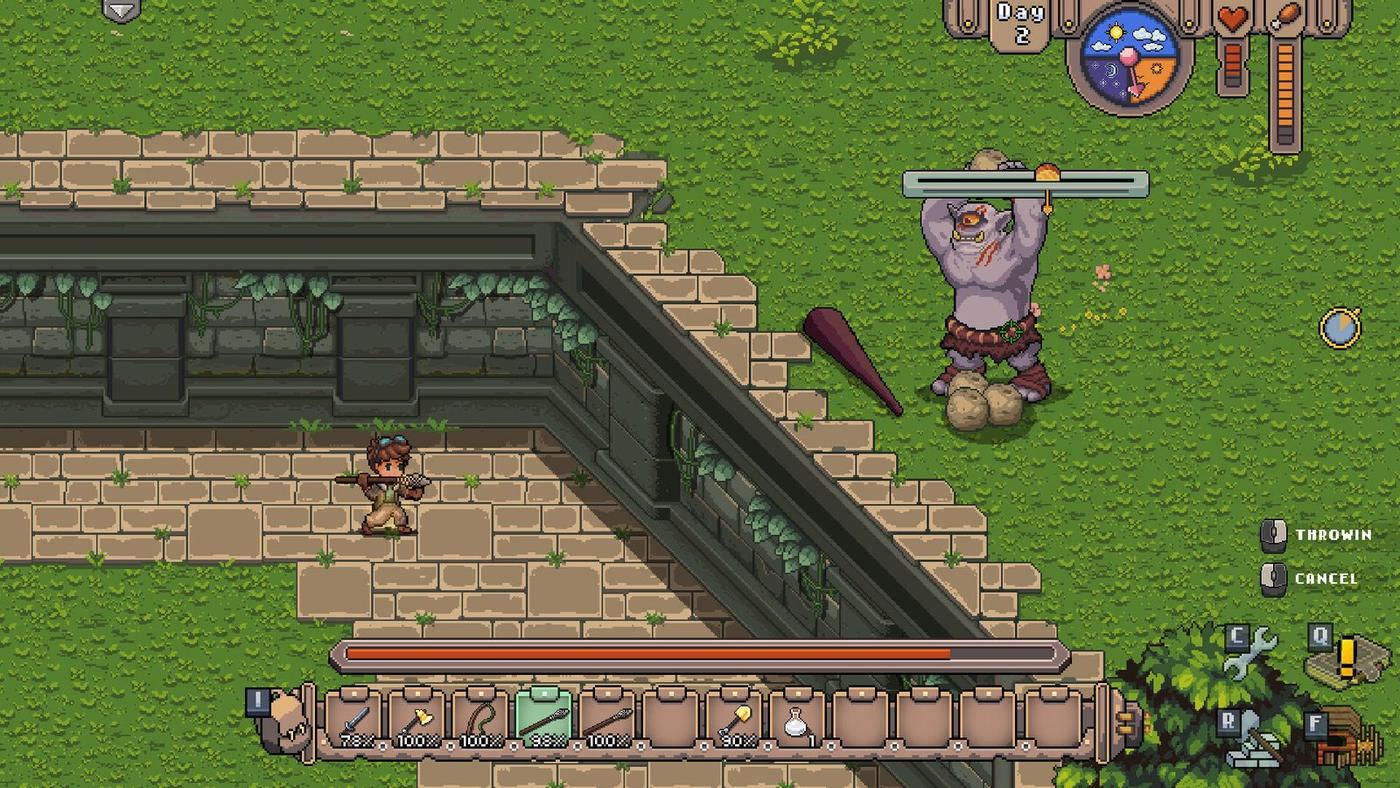
The documented combat verbs are attack and throw. The official screenshots show square action buttons labelled ATTACK and THROW, alongside Q, C, F and R prompts, which are the game's own on-screen hints rather than a documented binding list.
| Verb | Documented | Notes |
|---|---|---|
| Attack | Yes, on-screen prompt | Melee with equipped weapon |
| Throw | Yes, on-screen prompt | Spear throwing for hunting |
| Equip / unequip | Yes, patched 7 and 9 Nov | Hotbar action |
| Move furniture | Yes, patched 7 Nov | No tool required |
The 7 November patch also fixed a combat interface problem: when using controller shortcuts to equip tools or weapons, the examination text that appeared above the character's head no longer displays, so it does not obstruct your view mid-fight.
No keybind table, and why
Because the game does not publish one and the bindings may be remappable in the settings menu. A table of invented bindings would be wrong for anyone who has changed them, and wrong for anyone whose keyboard layout differs.
What is documented is the shape of the interface: a hotbar along the bottom with item slots, action buttons on the right, a day counter and status icons top-right, and prompts that appear contextually. Enough to navigate the game without guessing at specific keys.
A controller that is not working
Four things to try, in order.
Update to the 9 November build, which is the last input patch. Then check whether the problem is specific to an action: if it is the hotbar, the 7 and 9 November patches are the fix. If it is a boss interaction prompt, the 5 November patch addressed that. If it is fuel being added to a fire while you are taking food out of a kitchen, that was a controller-specific bug fixed on 7 November.
Steam Deck controller support was fixed on 6 November, and that patch leads with the announcement, which suggests it was the most-requested fix in the first days.
Reading the on-screen interface
The game does not publish a keybind list, but it does display its own prompts, and those are the most reliable documentation available because they come from the running build.
| Element | Where it sits | What it tells you |
|---|---|---|
| Hotbar | Bottom of the screen | Item slots, the thing you unequip from |
| Action buttons | Bottom right | Square prompts such as ATTACK and THROW |
| Day counter | Top right | How long you have been on the archipelago |
| Status icons | Top right, beside the day | Hunger and whatever else is active |
| Contextual prompts | Near the character | What the nearby object will do |
| Skip tag | During cutscenes | SKIP with an ESC hint |
Every input change in launch week was about one of those elements. The hotbar gained the ability to unequip tools on a controller. The examination text above the character's head was suppressed during combat so it stopped covering the fight. The first boss's interaction prompt got fixed. Read together, they describe an interface that shipped slightly rough and was smoothed in eight days.
A controller checklist
If input feels wrong, work down this list before assuming anything is broken.
Update to the current build, which is the one that shipped on 9 November with the gamepad hotbar fix. Then test one action at a time rather than the whole scheme: if attacking works and unequipping does not, you are on a build older than 9 November, and that is the whole answer.
If the problem is that the game swings at a structure instead of moving it, empty your hands. Since 7 November, moving furniture is a native action and the hammer is demolition-only, so a held tool is exactly the wrong state.
If a boss prompt does not appear at all, that was a specific 5 November bug. If fuel goes into a fire while you are taking food out of a kitchen, that was a specific 7 November bug. Both are fixed, and both were controller-only, which is a pattern worth recognising: the keyboard path and the pad path were tested differently.
A note on the settings menu
Difficulty lives under ESC, then Options, and can be changed at any time. Documented in the 7 November announcement. Where other settings live is not published, and this page will not guess.